How to Choose the Right Scanner
Volume, paper types, speed and software: what to look for when you scan in-house.
Read the guidePaper is still everywhere: files in cabinets, boxes in storage, plans in drawers and forms arriving every day. A document scanning service turns it into digital files your people can find in seconds, and looks after the originals while it does.
Key points
This guide explains what a document scanning service does, how different documents are handled, and what to agree before you start. It covers paper documents and forms, plan and drawing scanning, legal and financial records, archives and books, and how scanned files are organised, stored and delivered. It is general information, not legal advice, so check your own obligations.
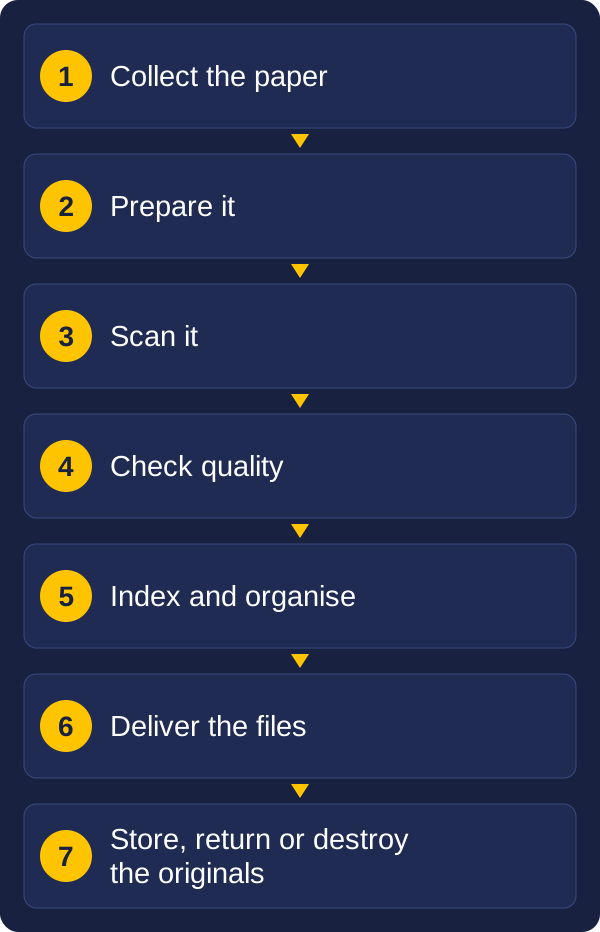
Scanning is only one step. A complete document scanning solution covers the whole journey from the box to the system your staff use:
When people talk about "scanning and storing documents electronically", this is what they mean. The files are only useful if they can be found, trusted and kept for as long as they are needed.
Different paper needs different handling. This table is a quick guide, and each type is explained below.
| Document type | How it is scanned | Typical setting | What to agree |
|---|---|---|---|
| Paperwork and files | High-speed sheet-fed scanner | 300 dpi, black and white or colour | How files are split and named |
| Forms | Sheet-fed scanner, with the details read into fields | 300 dpi | Which fields to capture and how they are checked |
| Plans and drawings | Large-format scanner, fed or flatbed | 300 to 400 dpi, colour where it carries meaning | Drawing number, revision and project index |
| Legal documents | Sheet-fed or flatbed, with originals tracked closely | 300 dpi, colour for seals and signatures | Which originals must be kept as paper |
| Financial documents | High-speed scanner, with key data captured | 300 dpi | Retention periods and how data reaches your systems |
| Records and archives | Depends on condition, often with extra care | 300 to 400 dpi or more, colour | An archive format, such as PDF/A or TIFF |
| Books and bound volumes | Face-up book scanner, no unbinding | 300 to 400 dpi, colour | Whether bindings can be removed |
Most paper document scanning is everyday paperwork: client files, HR records, correspondence, reports and contracts. Scanning paperwork like this is the most common job, and the easiest to get right with a little planning. It is scanned on high-speed production scanners that handle mixed paper sizes and weights, and read both sides of each page in one pass.
When scanning paper documents, two things make the difference between a pile of images and a useful collection:
Forms are different, because the value is in the answers, not the page. When forms are scanned, the details in each field, such as names, dates, amounts and ticked boxes, can be read and turned into data. That data can then go straight into a business system, instead of someone keying it in by hand. Handwriting and unclear entries are checked by a person, so the data can be trusted. See From OCR to AI for how this capture works.
Plans, drawings and maps are among the most valuable records an organisation holds, and among the hardest to scan. A plan scanning service uses large-format scanners, which take originals up to A0 and beyond, rather than ordinary office scanners.
Large-format scanning suits backlogs of plans held by councils, builders, engineers, architects, surveyors, utilities and property managers. If you would rather scan drawings yourself, our large-format scanner finder shows which scanner fits your widest original, and our guide to digitising drawings, plans and maps covers the detail.
Scanning legal documents needs more care than everyday paperwork, because of what they contain and what they may be needed for.
Invoices, receipts, statements, payroll records, tax records and loan files make up a large share of the paper many organisations keep. Financial document scanning does two jobs at once.
See What Happens After the Scan for how captured data connects to payables and other business tasks.
Records scanning (sometimes called record scanning) covers the files an organisation keeps because it has to: client and patient files, property and asset records, personnel files and minutes. Archival scanning goes a step further, for older, fragile or historically important material that must be kept for a long time.
When scanning archival documents, three things matter most:
Before scanning an archive, decide what is worth scanning. Records past their retention period can often be destroyed instead, which saves the cost of scanning and storing them. Our guides to digitising paper archives and keeping records compliant explain how to plan it.
Registers, ledgers, minute books and other bound volumes cannot go through a sheet-fed scanner without being taken apart. There are two ways to scan them:
Decide which approach suits each volume before work starts, because unbinding cannot be undone.
The reason to scan and digitise documents is to find them again. Document scans with no index are almost as hard to search as the paper. Scanning and organising documents should be planned together, before any scanning starts.
Much of the index can be captured automatically from barcodes, cover sheets or the documents themselves, with a person checking anything uncertain.
Document scanning and archiving services look after two things: the digital files and the paper originals.
| Option | What happens | Suits |
|---|---|---|
| Secure storage | Originals go into a secure records storage facility, listed and retrievable on request | Records you must keep as paper, or are not ready to destroy |
| Scan on demand | Boxes stay in storage, and a file is scanned and sent to you only when someone asks for it | Large archives that are rarely used |
| Return | Originals come back to you after scanning, in the same order | Working files and records you want on site |
| Secure destruction | Originals are destroyed after an agreed check period, with a certificate of destruction | Paper you are allowed to dispose of once scanned |
The digital files need a home too: a document or records management system, a secure shared drive, or a business system that uses them. Agree the file formats, where they will be delivered, and how they will be backed up, before the first box is collected.
An outsourced scanning service suits one-off backlogs, large or uneven volumes, plans and archives that need specialist equipment, and organisations without the space or staff to scan. Scanning in-house suits steady, everyday volumes and documents that must stay on your premises. Many organisations do both: they outsource the backlog, then scan new paper themselves.
Commercial document scanning services bring equipment, trained staff and secure facilities that are hard to justify for a single project. Our guide to outsourcing your document process compares the options, including a digital mailroom for incoming mail. If you plan to scan in-house, our scanner finder helps you choose a document scanner.
Professional document scanning is measured by what comes back and how the paper was looked after. Whoever handles the scanning of documents, these are the things worth agreeing in writing:
Vision and Beyond has worked with scanning, document capture and records for over 30 years. We bring the parts of a scanning project together, so you deal with one team:
A scanning project needs setup time and investment, so we start by scoping it with you, then agree a first phase so the effort and cost are clear. We stay involved after the scanning is done.
A service that collects your paper, prepares and scans it, checks and indexes the files, and delivers them in digital form. The originals are then stored, returned or securely destroyed.
Sending your scanning to a specialist provider instead of doing it yourself. The provider supplies the equipment, trained staff and secure facility, and delivers the files to you.
Yes. Plans and drawings are scanned on large-format scanners that take sheets up to A0 and beyond, usually at 300 to 400 dpi, and indexed by drawing number, revision and project.
Many can, once scanned and checked, but some originals, such as signed deeds, wills and sealed documents, may need to be kept as paper. Agree which items to keep with your legal team first.
It depends on the record. For example, Australian businesses generally need to keep tax records for five years. Check what applies to your records with your accountant or adviser.
Scanning older or important records to a higher standard, usually in colour at 400 dpi or more, with careful handling, and saving them in a long-term format such as PDF/A or TIFF.
Yes. A book scanner photographs each page from above while the book rests open in a cradle, so the binding stays intact.
Each file is named and tagged with agreed index details, such as a client name, file number, date or document type, and made text-searchable with OCR. The folder structure is agreed before scanning starts.
It is kept in secure storage, returned to you, or securely destroyed after an agreed check period with a certificate of destruction.
Outsourcing suits backlogs, large or uneven volumes and specialist items such as plans and books. In-house suits steady everyday volumes. Many organisations combine the two.
Start with four facts: what kinds of documents you have, roughly how much (in boxes, shelf metres or plan drawers), what condition they are in, and what you need the digital files to do. Those answers decide the equipment, the standards and whether outsourcing, in-house scanning or a mix makes most sense.
If you would like to talk it through, send us a message with your volumes, the types of documents and the problem you want to solve, and we will come back to you with how we would approach it.
These guides may also help:
Tell us what you have, roughly how much, and what you need to do with the files. We will come back to you with how we would approach it.