Preparing Your Documents for AI
How clean, searchable, well-labelled scans let AI work from your own records, and how we help you get there.
Read the guideMost paper archives don't get digitised because the job looks too big to start. Boxes of files, no clear owner and no idea what it will cost. The way through is a plan.
Key points
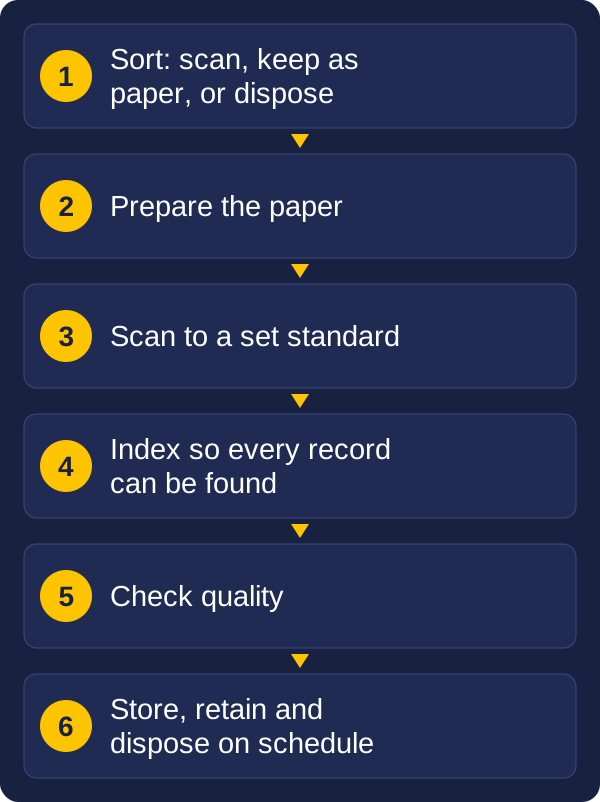
Decide what is worth scanning, prepare it, capture it to a standard, and make sure the result can be found again. This guide walks through that plan in plain terms, so you can scope the work before you spend anything. It also covers when it makes sense to bring in outside help.
Scanning is not the goal. The goal is what it makes possible:
Knowing which of these matters most to you decides what to scan first and how good the scans need to be.
Do not scan everything by default. Every page you scan has a cost, and some of it should not be kept at all. Sort the archive into three groups:
| Group | What it means | Examples |
|---|---|---|
| Scan and keep | Still needed, or required by law to be kept | Active client files, contracts, property records, drawings, personnel files |
| Keep as paper only | Original must be kept in its physical form, or the copy has no extra value | Some legal originals, items of historical value |
| Dispose | Past its required retention period and no longer needed | Old duplicates, expired records, drafts |
The third group matters most. Scanning records you are allowed to destroy means paying to digitise, store and secure them for nothing. Check your retention rules before you start, and get a records or legal owner to sign off what can be disposed of.
If you are unsure how much paper there is, measure it. Count boxes or shelf metres, then sample a few boxes to estimate pages per box. A rough number is enough to plan with.
There are two ways to approach an archive, and many organisations use both.
A sensible order is to start day-forward, so the problem stops getting bigger, then work through the back-file in stages. Trying to scan everything in one go is the most common reason these projects stall.
Preparation takes more time than the scanning itself, and it decides how smoothly the scanning goes.
The mix of paper decides the equipment. A bound register, a stack of A4 files and a roll of drawings are three different jobs. Our scanner guide explains what to look for, and the finders for document scanners and large-format scanners help you narrow it down.
Three decisions shape the result.
Quality. Set a standard and stick to it. For text documents, 300 dpi is the usual level. Fine detail, drawings and items you may want to enlarge need more. Black and white keeps files small, and colour is worth it where it carries meaning, such as stamps, highlights or photographs.
Text. Running OCR on the scans makes the content searchable. Without it, a scanned page is only a picture. Handwriting and poor originals need more checking.
Indexing. This is where most projects succeed or fail. Every document needs enough information attached to be found again: a reference number, a name, a date, a document type. Decide the index fields and the naming rules before scanning begins, not after. Information can often be taken from the document automatically, with a person checking the doubtful ones.
Build a quality check into the process. Sample the output each day for missing pages, skewed or unreadable images and wrong index data. Problems found on day one cost far less than problems found after the paper has gone.
You can scan the archive yourself, hand it to an outside scanning service, or combine the two.
| Item | Scan in-house | Outside service |
|---|---|---|
| Best for | Ongoing scanning, and sensitive records that must stay on site | A large one-off back-file |
| Equipment | You buy and look after it | Provided by the service |
| Cost pattern | Up-front equipment, then staff time | Priced by volume, with no equipment to buy |
| Control | Full control of handling and privacy | Depends on the provider and their security |
| Reuse | The scanner keeps working after the project | Nothing is left once the project ends |
A common pattern is to use an outside service for the one-off back-file and buy a scanner for the day-forward work. Vision and Beyond works with specialist document storage and scanning organisations, so we can arrange outsourcing as well as supply equipment, and help you decide which mix suits the job. Whichever you choose, ask where the paper will be handled, who can access it, and how privacy and security are managed.
A scanned archive is only useful if it is managed. Plan for what happens after the scanning:
This is the part of the project that keeps paying back, and it is the part most often left until last. Planning it at the start means the index fields, the naming rules and the retention rules all line up.
Measure what you have, decide what must be kept, what can go and what matters most, then start scanning new paper as it arrives while you plan the back-file.
No. Records past their retention period and no longer needed should be disposed of, not digitised. Check your retention rules and get sign-off first.
Day-forward scanning captures new paper as it arrives. Back-scanning converts the existing archive, usually in priority order.
Only after the scans have passed quality checks and you have confirmed that a digital copy is acceptable for that type of record.
You do not need every answer before you begin. A good first step is a short list:
Vision and Beyond helps organisations with document capture and records management, from choosing the right scanner to setting up indexing, storage and retention. Through our partnerships with document storage and scanning specialists, we can also arrange outsourced scanning, secure storage and destruction, and we stay involved after the work is done. If you would like to talk through an archive, send us a message with a description of the paper, roughly how much there is and what you want to be able to do with it.
These guides and tools may also help:
Tell us what you scan, roughly how much, and what you need to do with the files. We will reply with a recommendation.