Vision & BeyondSince 1996

Preparing Your Documents for AI

In this article
  1. How can AI use my documents?
  2. Why not just use search?
  3. What does AI need from a scanned document?
  4. Can Microsoft Copilot use scanned documents?
  5. Can AI summarise everything we hold on a customer?
  6. Preparing your document library
  7. Is it safe to give AI my documents?
  8. How Vision and Beyond helps
  9. Common pitfalls
  10. Frequently asked questions
  11. Where to start

An AI assistant can only answer from documents it can read. Paper in a filing room, and scans that are crooked, faint or have no searchable text, are invisible to it. Turning that material into clean, searchable, well-labelled digital files is what lets an organisation's AI work from its own records.

Key points
  • AI can only answer from documents it can read, so paper and image-only scans are invisible to it.
  • Clean images, accurate searchable text, clear labels and the right permissions decide how well AI works from your records.
  • Start with one collection, scan it to an AI-ready standard, and keep new documents flowing in the same way.
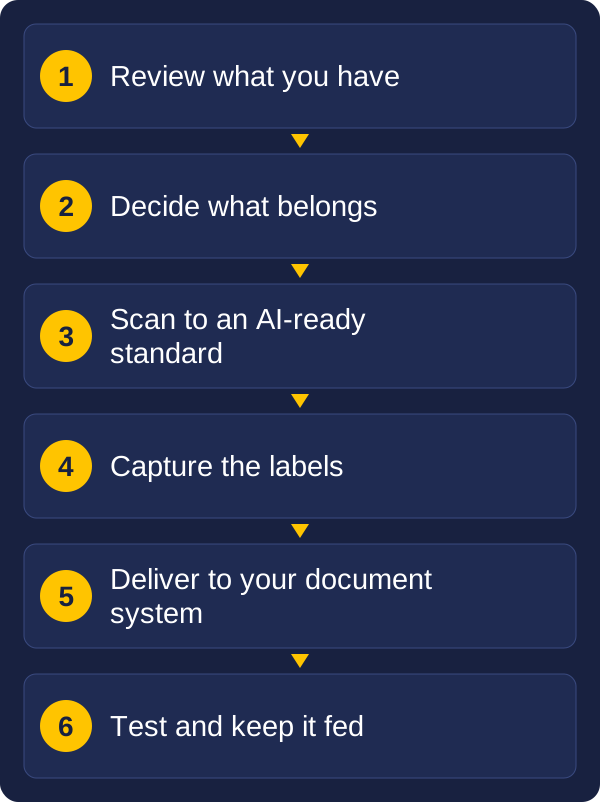
Diagram of preparing documents for AI: review what you have, decide what belongs, scan to an AI-ready standard, capture the labels, deliver to your document system, and test and keep it fed.
How to get your documents ready for AI

This guide explains how scanned documents can feed your AI tools, including Microsoft 365 Copilot, what the AI needs from each scan, how to prepare your document library, and how Vision and Beyond helps you get there. It is general information, so check your own security, privacy and records obligations.

How can AI use my documents?

"Educating" an AI can mean two quite different things.

  • Letting it look your documents up. The AI searches your files when someone asks a question, and answers from what it finds. Nothing is retrained. When you scan a new document, the AI can use it as soon as it is stored and indexed. This is how most organisations use AI with their own records.
  • Training a model on your documents. The model itself is adjusted using your content. It is slower and costlier, and it is rarely needed for everyday business questions.

For most organisations, the first approach is the practical one. It also puts the focus where we can help: the quality, labelling and organisation of the documents the AI looks up.

Searchable text is the foundation, and for many tasks plain search is all you need. If you know a file name or an exact clause, keyword search is faster, cheaper and more predictable than AI. AI adds value when the question is about meaning, not exact words:

  • You do not know the wording. A question about contracts that can be ended without penalty also finds "early exit" or "cancellation without cost", which a keyword search would miss.
  • The answer spans several documents. Search returns a list of files to open. AI can read several and give one answer, with the sources shown.
  • You want an answer, not a file. It can pull a notice period or an obligation out of a long agreement.
  • You want a summary or a comparison. It can summarise a long case file or compare two versions of a contract.
  • People do not know where to look. A new team member can ask in plain language, without knowing the folder structure.

For exact lookups and anything where an error matters, people should still check the source document. That is why the original scan should always be one click away. Both approaches depend on the same thing: good scans, accurate text, clear labels and the right permissions.

What does AI need from a scanned document?

An AI tool is only as good as the files it reads. A scan that looks fine to a person can still be a poor source for a machine.

  • Accurate, searchable text. Image-only files have no text for the AI to use. OCR creates it, and cleaner images give more accurate text. Errors in the text are repeated in the AI's answers. Our guide on from OCR to AI explains the difference.
  • Intact layout. Tables, columns and forms need to stay in order. Scrambled columns on an invoice or schedule change what the numbers mean.
  • Good labels (metadata). Document type, date, client, project and version let the AI find the right file and tell current documents from superseded ones.
  • The right file type. Searchable PDF suits most records. Our guide to scanned file types covers the choices.
  • Complete documents. A missing page can change an answer, so page counts and quality checks matter.
  • Handwriting, stamps and drawings. These are harder for any text reader, so decide early how much of your archive depends on them and test a sample.

This is why capture quality matters more than it first seems. The first scan sets the ceiling for everything built on it.

Can Microsoft Copilot use scanned documents?

Scanned documents that are stored in a shared document system, such as SharePoint, can be used by AI tools such as Microsoft 365 Copilot. Microsoft states that Copilot and agents respect existing permissions, sharing settings and policies, so people see answers only from documents they are already allowed to open.

Setting up Copilot, SharePoint and the permissions around them is specialist work for your IT team or Microsoft partner, and we are not a substitute for that. Our part is the documents: scanned cleanly, readable by software, labelled and delivered to the right place. Whatever AI tool you choose, those documents are what it works from. Our guide on what happens after the scan shows how files and data reach your systems.

Can AI summarise everything we hold on a customer?

One of the most useful things AI can do with scanned records is bring together what you hold on a customer. Contracts, letters, applications, invoices and case notes sit in different places, and AI can read across them to produce a short summary, with links back to each source.

That could mean:

  • A one-page history showing agreements in force, key dates, obligations and recent contact.
  • A list of open items, such as renewals or follow-ups, drawn from several documents.
  • A handover brief when an account changes hands.
  • A comparison across customers, such as which clients share a particular contract term.

This depends on good capture:

  • Every document tied to the right customer. Names are spelled differently from one document to the next, so a customer reference captured and indexed at scan time is far more reliable than guessing from the text.
  • Complete history. If part of it is still on paper, the summary has gaps.
  • Dates and versions. Superseded documents should not be treated as current.
  • Sources you can check. Each point should link to the page it came from.

Take care with privacy and access. A customer summary gathers personal or commercially sensitive information in one place, so check your privacy obligations before the AI builds one, and make sure it only shows what the person asking is allowed to see. For facts such as balances and dates, your accounting or customer system is usually the more reliable source. The AI adds most where the information lives in documents, such as contract terms and correspondence.

Preparing your document library

A well-organised library helps both people and AI find the right document. A good starting structure:

  • Libraries by purpose. Group documents by what they are, such as contracts, invoices, case files or drawings, so each library can have its own labels.
  • Columns for the details that matter. Document type, date, client or project, status and version. These can be filled in at capture, or by the document system afterwards.
  • Consistent file names. Names that follow one pattern help people, and give the AI more to work with.
  • One current version. Keep superseded documents clearly marked, or archive them, so the AI does not draw on outdated terms.
  • Clear ownership. Every library and site should have someone responsible for what goes in and who can see it.

Is it safe to give AI my documents?

AI tools generally work from what each person is already allowed to see, so scanning more documents into a shared system also means checking who can access them. Review permissions before loading large collections of records, keep sensitive material restricted, and decide which records should not be available to AI at all. Microsoft publishes guidance on preparing SharePoint for Copilot that your IT team or Microsoft partner can work from.

We plan the scanning and capture around the settings your IT team applies, so sensitive records are handled as you intend. Retention and disposal rules still apply to scanned records, which our guide on keeping records compliant explains.

How Vision and Beyond helps

Vision and Beyond is an authorised reseller of Kodak Alaris. We supply the scanners and capture software, build the integration that connects them to your systems, and organise outsourced scanning through our partners. For AI, that becomes a service that gets your paper ready and keeps new documents flowing in. It is delivered alongside your IT team or Microsoft partner, who look after the AI tool and document system settings.

  1. Review what you have. We look at your paper, your existing digital files and what you want the AI to answer.
  2. Decide what belongs. Not everything should be fed to an AI. We help separate what is useful from what is sensitive, outdated or not worth scanning.
  3. Scan to an AI-ready standard. Backfile and ongoing scanning, in-house, outsourced or a mix, with clean images, searchable text and quality checks.
  4. Capture the labels. Document type, dates, names and references are read and indexed, so each file arrives described.
  5. Deliver to your document system. Files and data arrive in the right library and columns automatically, through integration.
  6. Check access and labels. We plan around the permissions and sensitivity settings your IT team applies, so documents are seen only by the right people.
  7. Test with real questions. We try the AI on your documents, look at where answers fall short, and tune the capture to fix it.
  8. Keep it fed. New paper and mail are scanned and delivered the same way, so the AI stays current.

You can start with a single collection, such as one department's contracts or one archive, and extend from there.

Common pitfalls

  • Scanning everything. More documents is not better. Poor, duplicate or outdated files make answers worse.
  • Image-only files. If the text was never created, the AI has nothing to read.
  • No labels. Without dates, types and versions, the AI cannot tell a current document from an old one.
  • Opening up access by accident. Check permissions before loading large collections of records.
  • Treating AI answers as final. Keep the original document one click away, so people can check the source.
  • Forgetting new paper. If new documents still arrive the old way, the AI's picture of your business ages quickly.
  • Overlooking retention. Records still need to be kept and disposed of according to your obligations.

Frequently asked questions

Can scanned documents be used by AI?

Yes, once they have accurate searchable text, clear labels and are stored where the AI tool can reach them. Image-only scans give the AI nothing to read.

Can Microsoft Copilot use documents stored in SharePoint?

Yes. Microsoft states that Copilot and agents respect existing permissions, so people see answers only from documents they are already allowed to open. Setup is best handled by your IT team or Microsoft partner.

Is AI better than searching searchable text?

Not always. Search is faster and more predictable for exact lookups. AI adds value when the question is about meaning, spans several documents, or needs a summary or comparison.

Can AI summarise everything we hold on a customer?

It can, if every document is tied to the right customer, the history is complete and the sources are linked. Check privacy obligations and access first.

Does AI need to be trained on my documents?

Usually not. Most organisations let the AI look documents up when a question is asked, which means new scans can be used as soon as they are stored and indexed.

Where to start

Pick one collection where a good answer would save time: contracts that nobody can find, case files, procedures or past projects. Check how many of them are on paper, how they are stored today, and who should be able to see them. That is usually enough to scope a first step.

If you would like to talk it through, send us a message with the type of documents, roughly how many, and what you would like the AI to do with them.

These guides may also help:

Talk to us about scanning and document capture

Tell us what you scan, roughly how much, and what you need to do with the files. We will reply with a recommendation.

Email
sales@vision-and-beyond.com.au
Phone
02 4311 6379
Post
PO Box 441, Pyrmont NSW 2009

Send us a message

Include what you scan, roughly how much, and what you need to do with the files.