Preparing Your Documents for AI
How clean, searchable, well-labelled scans let AI work from your own records, and how we help you get there.
Read the guideScanning and data extraction are not the goal. The goal is for information to arrive in the right place, already read and checked, and to start the next step. A scanner or a capture tool is only the first link in that chain.
Key points
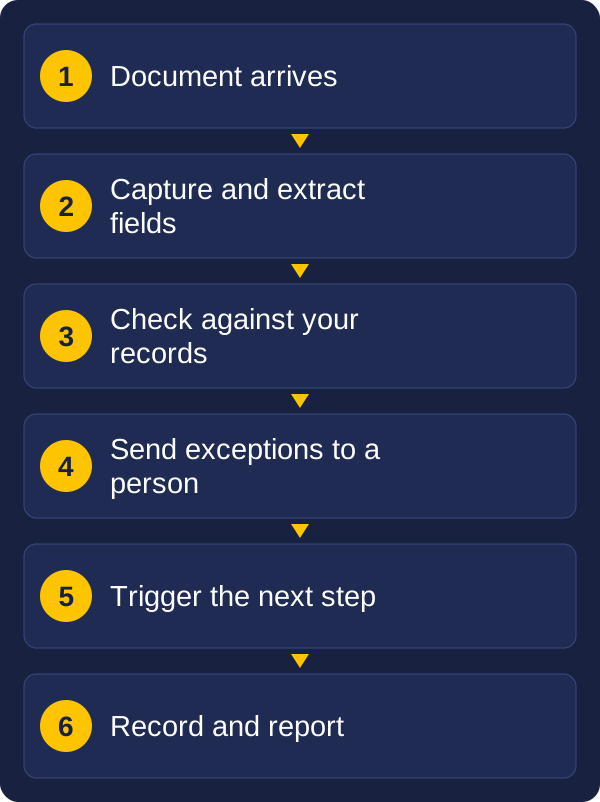
This guide shows how captured documents feed everyday business tasks: buying, paying, contracts, hiring, forms and compliance. The inputs look different, but the pattern is the same. It also covers where people still need to check the work, and what to automate first.
Almost every document-driven task follows four steps:
Most of the value is in steps 3 and 4. Reading a document into a system saves typing. Checking it and starting the next step saves the waiting, chasing and rework around it.
| Task | What arrives | What is extracted | Checked against | What it triggers |
|---|---|---|---|---|
| Procurement | Quotes, purchase orders | Supplier, items, prices, terms | Approved suppliers, budget | Comparison, order, approval |
| Accounts payable | Invoices, credit notes | Supplier, invoice number, amounts, tax | Order and delivery record | Approval, payment |
| Contract management | Contracts, renewals, amendments | Parties, dates, value, notice periods | Contract register | Renewal and expiry reminders |
| HR | Applications, onboarding forms, certificates | Personal details, qualifications, dates | Employee record, role requirements | Onboarding steps, file updated |
| Forms and claims | Applications, claim forms with attachments | Applicant, details, supporting documents | Customer record, rules | Case opened, routed for assessment |
| Compliance | Licences, certificates, insurance | Holder, type, expiry date | Register of requirements | Renewal reminder, audit record |
| Mailroom | Mixed post and email | Document type, sender, reference | Open cases and accounts | Routed to the right person |
Buying is a chain of documents: a request, quotes, an order, a delivery note and an invoice. Each one holds information the next one needs, which is why this process rewards capture more than almost any other.
The benefits are practical: fewer keying errors, faster approvals, a clear record of who approved what, and less time spent finding the paper behind a payment. Invoices are only one part of it. The same extraction that reads an invoice also reads the quote that started the process.
Contracts are signed once and then forgotten, until a renewal date passes or a dispute starts. The information that matters is buried in long documents, often in several versions.
Capture changes that. Once a contract is scanned or collected and searchable, the key facts can be pulled out and kept in a register:
The register then does the remembering. It can send a reminder before a notice period closes, show which contracts end this quarter, and give a manager the signed version in seconds. Extraction from contracts is a good place for a person to confirm the key fields, because the clauses are long and the cost of a mistake is high.
HR runs on documents: applications, resumes, contracts, identity and qualification checks, leave forms and performance reviews. Much of it is sensitive, and it needs to be found quickly, kept for the right time and seen only by the right people.
Capture helps at each stage:
Because the content is personal, access control matters as much as capture. Decide who can see what before documents are loaded, and keep an audit trail of who opened a file.
The same pattern fits many other jobs.
In each case the extraction is slightly different, but the questions are the same: what do you need to know from this document, what should it be checked against, and what should happen next?
In most organisations the same process receives documents in several forms. An invoice may arrive on paper, as a PDF attached to an email, or as a link in the body of a message. A claim may come with a form, a photo and three attachments in one email.
Paper is structured by the page. Email is not. Messages vary in layout, the useful details can sit in the body, the subject line or an attachment, and one email can carry several documents or none. That makes email harder to handle than a scanned page, and it is where many projects stall.
The answer is to treat all the inputs as one stream:
When paper and email feed one process, people stop caring which way a document arrived. Vision and Beyond has long experience extracting information from email as well as from scanned documents, and bringing the two together.
No extraction is perfect, and a good process does not pretend it is. Instead of trusting every result, it decides what happens to the uncertain ones.
Most tools give each extracted field a confidence level. A sensible setup uses it:
This keeps people on the exceptions, which are a small share of the work, instead of on every document. It also builds trust, because staff can see what the system was unsure about. Start with a stricter check, then loosen it as the results prove themselves.
You do not need to do everything at once. A good first project has four qualities:
Invoices and forms often fit. So do a mailbox that receives the same few document types every day. Prove one process, measure the time saved, then extend the same approach to the next. Each new document type is easier because the capture, checking and routing already exist.
Extracted data is only useful when it reaches the system where the work happens: your accounts package, procurement or contract register, HR system, case system or document store. This last step is where many projects fall short, because every system accepts data differently.
There are three common routes:
Whichever route you use, plan the connection at the start, not at the end. Decide what the target system needs, what fields it requires and how errors will be reported. Vision and Beyond builds software and integrations as well as supplying scanners and capture tools, so the whole chain can be designed as one.
Common uses are procurement (quotes and orders), accounts payable, contract management, HR files, forms and claims, compliance certificates and sorting the mailroom.
Yes, for the uncertain results. A good process lets confident, matching data go straight through and sends low-confidence or mismatched fields to a person.
Yes. Email is less structured than paper, but messages and attachments can be separated, identified and read, so paper, PDFs and email feed one process.
Choose a process with high volume, a regular layout, a clear next step and a painful manual task today. Prove it, then extend the approach.
Through a built-in connection where one exists, through integration that passes data between systems, or through custom software for processes that do not fit an off-the-shelf product.
Pick one process and answer five questions about it:
The answers show whether you need scanners, capture software, an integration or a small piece of custom software, and usually in which order.
Vision and Beyond supplies scanners and capture tools, builds the software and integrations that connect them to your systems, and can organise backlog scanning through partners. We stay involved after the work is done. If you would like to talk through a process, send us a message describing the documents and what needs to happen to them.
These guides may also help:
Tell us what you scan, roughly how much, and what you need to do with the files. We will reply with a recommendation.