Keeping records compliant comes down to three things: keeping what you must for as long as you must, protecting it while you have it, and being able to prove what happened to it.
Key points
Compliance means keeping records as long as required, protecting them, and being able to prove what happened to them.
A retention schedule, a disposal process with legal holds, and a protected audit trail are the core of a records process.
Email, scanned copies and backups need to follow the same rules as everything else.
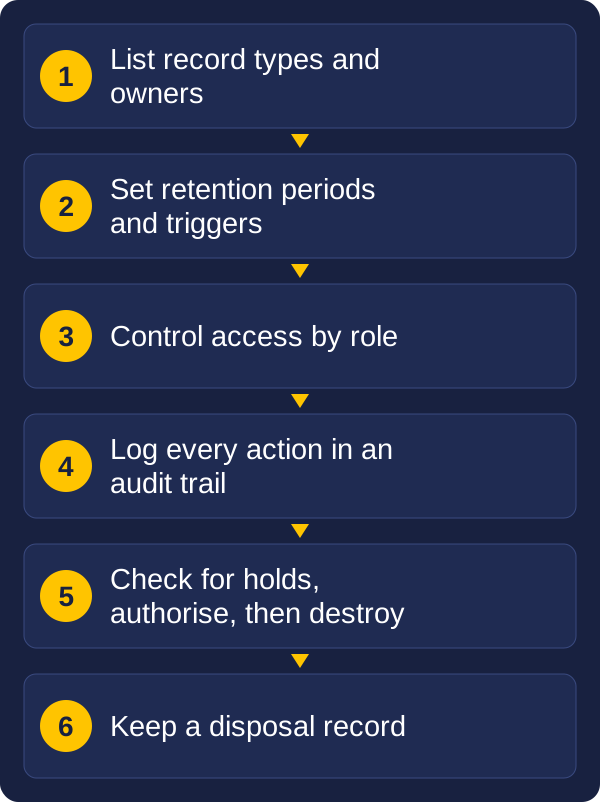
The core steps of a records compliance process
Most organisations do the first part reasonably well and struggle with the other two. This guide explains retention, disposal and audit trails in plain terms, and what a practical records process looks like. It is general information, not legal advice. Requirements differ by industry, state and type of record, so check your own obligations with your records or legal adviser.
What compliance means for records
Records compliance is not one rule. It is a set of obligations that come from several places: legislation for your industry, rules about privacy and information security, contract terms, and your own policies. If you can answer these questions for each type of record, you are most of the way there:
What is it, and who owns it? Every record type needs a named owner.
How long must it be kept? And what starts the clock: creation, the end of a contract, the closing of a case.
Who may see or change it? And how is that controlled?
Where does it live, and is that the one official copy?
What happens at the end? Who approves disposal, and how is it done?
Can you show your working? If someone asks what happened to a record, can you answer?
The last question is the one that gets organisations into trouble. A record that was disposed of correctly, but with nothing to show it, looks the same as one that was lost.
How long should records be kept?
A retention schedule is a simple table that says how long each type of record is kept, and what happens at the end. It replaces guesswork with a rule that everyone follows. A useful schedule answers these points for every record type:
Element
What it answers
Example
Record type
What kind of record is this?
Client file, contract, personnel file, plan or drawing
Owner
Who is responsible for it?
Finance, HR, property or engineering
Retention period
How long must it be kept?
Set by the rule that applies to it
Trigger
What starts the clock?
End of contract, closing of a case, completion of a project
Source of the rule
Why this period?
Legislation, contract or internal policy
Final action
What happens at the end?
Destroy, transfer to an archive, or review
Two cautions. Retention is a minimum for records you must keep, and a limit for personal information you should not keep longer than needed, so both sides apply. And the same document can appear in more than one category, so decide which rule wins and write it down.
How should records be disposed of?
Disposal is part of records management, not the opposite of it. Keeping everything forever is not safe. It increases storage costs, makes records harder to find, and leaves personal information exposed for longer than it should be.
Good disposal has five parts:
Check the schedule. Confirm the retention period has ended.
Check for holds. If a record is part of a dispute, investigation or audit, it must not be disposed of, whatever the schedule says. This is often called a legal hold.
Get authorisation. A named person approves the disposal before it happens.
Destroy securely. Paper is shredded or destroyed through a secure service, and digital records are permanently removed, including from backups where practical.
Keep a disposal record. Log what was destroyed, when, by whom, and under which rule. The log is your proof.
Disposal after scanning follows the same logic. Keep the original paper until the digital copy has passed quality checks and you have confirmed that a digital copy is acceptable for that type of record.
What is an audit trail?
An audit trail is a record of what was done to a record. It lets you show that your process was followed, not just claim it. A good trail captures:
Who did it, identified individually, not through a shared login.
What they did: created, viewed, changed, moved, shared, disposed of.
When, with a reliable date and time.
What changed, so you can see the version before and after.
Why, for important actions such as a disposal or an override.
The trail needs to be protected as well. If the people who manage records can quietly edit the log, it proves nothing. It should be kept separately from the records, be hard to alter, and be kept for as long as the records it describes.
Audit trails are also practical. They help you find where a record went, settle questions about who changed a document, and respond quickly to a request for information.
Access and security
Compliance also means controlling who can reach a record, and treating sensitive records with more care.
Classify records by sensitivity. Personal, financial, health, legal and commercially sensitive records need tighter controls than routine ones.
Give people only the access their role needs. Review access regularly, and remove it when people change roles or leave.
Protect records in storage and in transit, whether that is a locked room for paper or encryption and secure sharing for digital files.
Control copies. Every extra copy, whether printed, emailed or saved to a personal device, is another place the record can leak from and another thing to dispose of.
Plan for incidents. Know what you will do if a record is lost, wrongly shared or accessed by someone who should not have seen it.
Digital records: formats, email and scanned copies
Digital records bring their own compliance questions.
Email is a record. Emails and attachments that document a decision or a transaction need to be captured into the records system, not left in personal mailboxes where they can be lost or deleted.
Scanned copies. Many organisations can rely on a digital copy once the paper is properly scanned, but this depends on the type of record and your regulator. Confirm it before you destroy any originals.
File formats. Choose formats that will still open in future, and plan to migrate files when formats or systems change.
Backups. Keep backups, and be clear on how a disposal reaches them, so records do not live on in a backup long after they should have gone.
Cloud and third parties. Know where your records are stored and who can access them. You remain responsible for them when someone else holds them for you.
One official copy. Decide which version is the record, and avoid keeping competing copies in several places.
Common pitfalls
Keeping everything. It feels safe, but it raises cost and risk and makes real records harder to find.
A policy nobody follows. A retention schedule that lives in a document and not in the system is rarely applied.
No owner. Without a named person for each record type, disposal decisions never get made.
Disposing without evidence. Records destroyed correctly but with no log are hard to defend.
Forgetting holds. Disposal that runs automatically can destroy records that are part of an active matter.
Shared logins. If several people use one account, the audit trail cannot say who did what.
Ignoring email and shared drives. Much of the real record sits outside the official system.
Treating it as a one-off project. Records management is an ongoing process that needs review as laws, systems and the business change.
A starting checklist
You do not need a perfect system to improve. Work through this list in order:
List your record types and give each an owner.
Find the rule for each, whether that is legislation, a contract or policy, and record the retention period and its trigger.
Decide the official home for each type, and stop competing copies.
Set access by role, and review it on a schedule.
Turn on audit logging and make sure the log is protected.
Agree a disposal process: check, check for holds, authorise, destroy, log.
Bring email and scanned documents into the same system, so one set of rules covers them.
Review once a year, and whenever your obligations or systems change.
Frequently asked questions
What is a retention schedule?
A table that says how long each type of record is kept, who owns it, what starts the clock and what happens at the end.
What is a legal hold?
A requirement to keep records that are part of a dispute, investigation or audit, even if their normal retention period has ended.
What should an audit trail record?
Who did what to a record, when, what changed and, for important actions, why. The trail should be protected from alteration and kept as long as the records it describes.
Can I destroy paper after scanning it?
Only once the scans have passed quality checks and you have confirmed that a digital copy is acceptable for that type of record under the rules that apply to you.
Where to start
Vision and Beyond helps organisations bring paper and digital records under control, from capture and scanning through to indexing, storage, retention and disposal. Through our partnerships with document storage and destruction specialists, we can also arrange secure off-site storage and destruction, and we stay involved after the work is done so the process keeps working as your obligations change.
If you would like to talk through your records, send us a message with the types of records you hold, roughly how much, and where they are kept today.