Preparing Your Documents for AI
How clean, searchable, well-labelled scans let AI work from your own records, and how we help you get there.
Read the guideOCR reads your documents. AI understands them. For years, OCR worked best on documents that look the same every time. Modern capture tools cope with variety and can tell what each document is. The question for most organisations is no longer whether paper and PDFs can become usable data, but how much capability they need to get there.
Key points
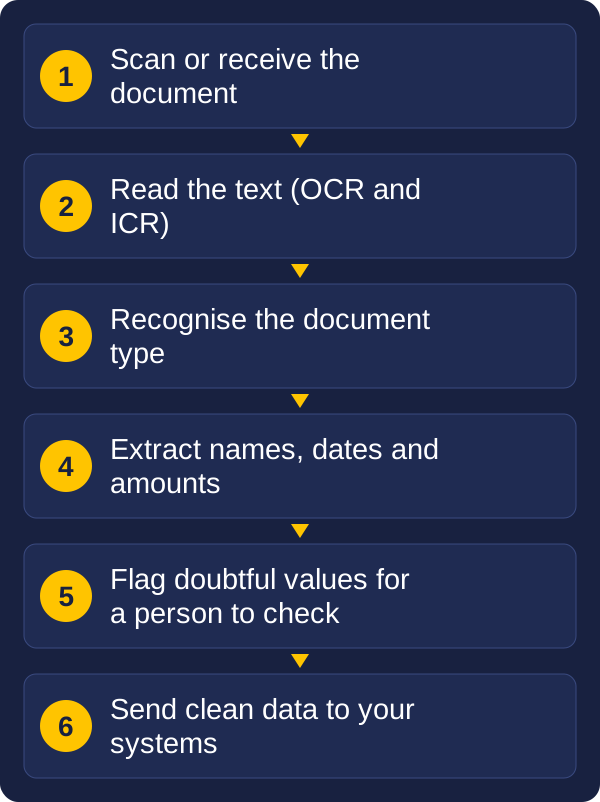
OCR (optical character recognition) turns a scanned page into text. ICR (intelligent character recognition) does the same for handwriting. Both work best on structured documents: forms with fixed boxes, surveys, or business documents from a source whose layout never changes.
The usual method is a template that tells the software where to find each piece of information. That is fast and accurate when the page matches the template.
It struggles when the page doesn't. A new layout means a new template, or someone keying the data in by hand. Traditional OCR reads the characters, but it does not understand what the document is.
Modern capture tools learn what different documents look like and what they say, instead of relying on a fixed layout. In practice they can:
Once documents become data, you can do more than file them. You can route each one to the right person, check details against your own systems, spot missing information, and search and report across thousands of records. Invoices, claims, applications, contracts and correspondence all benefit, and the saving shows up as less retyping and fewer errors.
Much paper work needs good scanning, tidy indexing and a few sensible checks, not the most advanced tools. Capture software generally comes in two levels, and the right one depends on your documents.
| Item | Straightforward capture | Advanced document automation |
|---|---|---|
| Best for | Paper-heavy work with known, repeatable documents, such as batches of forms and mail | Large volumes of varied documents, including mixed types and unstructured letters and contracts |
| What it does | Scans in batches, reads barcodes and key fields, flags missing information such as an absent signature, and sends files and data to your document system | Sorts documents by type, reads printed text and handwriting, understands unstructured content, and checks values against your own databases |
| Setup | Quicker to install and configure, often on a few workstations | More set-up: document definitions, rules and links to your business systems |
| Cost | Lower | Higher, but built to scale across a large organisation |
| Checking | Questionable items are flagged for review | A review station lets people compare extracted fields with the original |
A business scanning a steady flow of familiar paper is often best served by straightforward capture that is quick to set up and keeps costs down. An organisation with many document types, handwriting or free-form correspondence may need the advanced option, and the extra set-up pays off. AI can feature in both, but it is a tool, not the goal.
We supply both levels, so our recommendation follows your documents and your budget, not a product.
OCR (optical character recognition) turns printed text on a scanned page into digital text. ICR (intelligent character recognition) does the same for handwriting. Both work best on structured documents such as forms.
OCR reads the characters on a page. AI-based capture also works out what the document is and what the information means, so it can handle new layouts and pull out names, dates and amounts without a fixed template.
Not always. For documents with a consistent layout, template-based capture is quicker to set up and cheaper to run. AI-based capture is worth considering when documents vary widely or arrive in mixed batches.
It depends on the quality of the originals and the type of document. Good capture shows how confident it is in each value, so people check only the uncertain ones instead of everything.
A good first step is to pick one type of document or process and look at what slows it down today: how many documents arrive each month, how much variety there is, and how much is keyed in by hand. That shows whether capture software is worth it, and how much capability you need.
Tell us what you process and what slows you down. Send us a message with the kinds of documents you handle, roughly how many a month and the problems you face today, and we will talk through what is realistic. We have worked with document capture and records for over 30 years, and we can help with the scanners, capture software and workflow around it.
Tell us what you scan, roughly how much, and what you need to do with the files. We will reply with a recommendation.