Preparing Your Documents for AI
How clean, searchable, well-labelled scans let AI work from your own records, and how we help you get there.
Read the guideRPA follows a fixed script. An AI agent reads, interprets and decides. They do different jobs, and most organisations get the best results by using each where it fits.
Key points
Robotic process automation (RPA) and AI agents are often talked about as if one replaces the other. They don't. This guide explains the difference in plain terms, where each one earns its place in a digital transformation, and how to avoid paying for the wrong one. It also looks at where the information comes from, because paper, email and attachments are where most processes begin.
RPA uses software "robots" to repeat the clicks and keystrokes a person would make on a screen: open a system, copy a value, paste it into another, press save. It does exactly what it is told, every time.
That makes it a good fit for work that is:
Typical examples are moving data between two systems that don't talk to each other, producing routine reports, and updating records after an approval.
The strength of RPA is also its limit. A robot only knows the script it was given.
These limits are why some RPA projects stall after a promising start. The easy, predictable work gets automated, and the exceptions pile up for staff to handle by hand.
An AI agent can read and understand content, work out what is being asked, and choose the next step. Instead of following a fixed script, it works towards a goal and adapts when the situation is different from the last one.
That opens up work that RPA could never handle:
AI agents have limits too. They can be wrong, and they can be confidently wrong. They are less predictable than a script, which matters where the answer must be the same every time. And they need clear boundaries on what they may see and what they may do. For anything that affects money, customers or compliance, a person should check the result or approve it before it is final.
Every automated process starts with information, and most of it arrives inside something: a scanned form, a PDF, a drawing or, more and more, an email.
Email is the hardest source. There is no fixed layout. The request is in the body of the message, the detail is in one or more attachments, and a single email can hold PDFs, images, spreadsheets and a forwarded chain of earlier messages. Staff end up reading, sorting and retyping it by hand.
Data extraction is the step that turns all of this into something a process can use:
Most organisations need to bring paper and email together. Mail room scanning, paper forms and shared inboxes all feed the same processes, and they should end up in the same place with the same quality of data.
There are also two levels of capture. For documents with a consistent layout, simpler capture is quicker to set up and cheaper to run. For documents that vary widely, or for messy email, more advanced capture that can understand context is worth the extra investment. The right choice depends on the variety and volume of what you receive.
The task decides the tool, not the other way round. A quick guide:
| If the work is... | Best fit | Why |
|---|---|---|
| Repeating the same steps on structured data | RPA | Fast, predictable and cheap to run |
| Reading emails, letters or documents in many layouts | AI agent | It understands content, not just fields |
| Emails with attachments arriving in a shared inbox | Data extraction, with AI for the unusual cases | It reads the message and attachments together and passes clean data on |
| Paper that needs to become searchable, usable data | Scanning and capture | Everything after this depends on the quality of the capture |
| Moving data between two systems that offer a proper connection | Integration | More reliable than a robot clicking through screens |
| Deciding between options based on context | AI agent, with a person approving | It can weigh the details, a person owns the outcome |
| A task that must give the same answer every time | RPA or custom software | Fixed rules are easier to test and audit |
| A mix of reading, deciding and then updating systems | AI agent plus automation | The agent understands, the automation does the steps |
The strongest results usually come from combining them. The AI agent handles the part that needs understanding, and a fixed process handles the part that needs precision.
For example, an agent reads an incoming request and works out what it is and what it needs. Fixed automation then creates the record, routes it for approval and updates the right systems. If something doesn't fit, the agent explains why and hands it to a person.
It also pays to ask whether a robot is needed at all. Where two systems can be connected directly, an integration is usually faster, more reliable and easier to maintain than a robot imitating a person at a keyboard. Screen-based automation is best kept for older systems that offer no other way in.
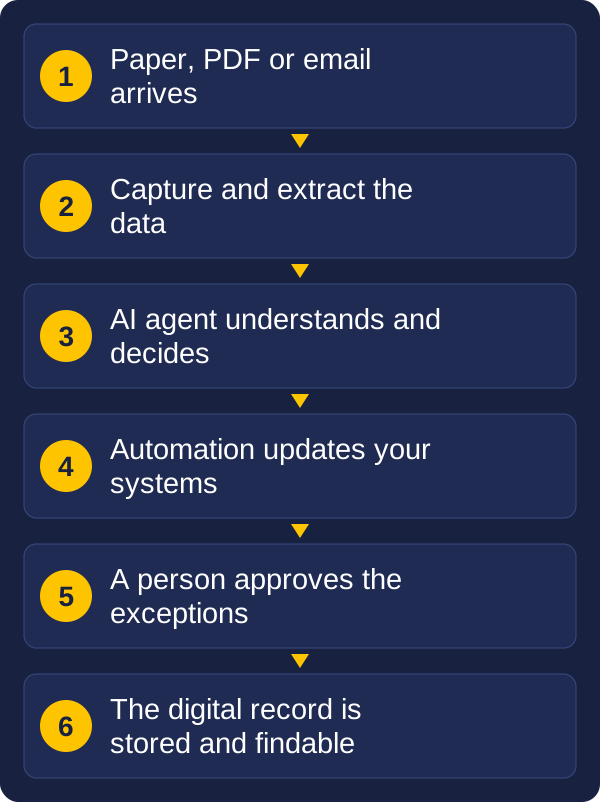
And both depend on good data. Whether information arrives as paper, a poor-quality image or a crowded email with attachments, the first step is capturing and extracting it properly, because every step after that works from what was captured. A complete process runs from capture, to extraction and understanding, to a decision, to action, and finally to a digital record that is stored and easy to find again.
A good transformation starts by understanding the work, then choosing the technology. A practical order:
RPA follows a fixed script, repeating the steps a person would take on a screen. An AI agent reads and understands content, works out what is needed and chooses the next step.
Not entirely. RPA is still a good fit for stable, rule-based work where the answer must be the same every time. AI agents handle variation and unstructured content. Most organisations use both.
When two systems offer a proper connection, a direct integration is usually faster, more reliable and easier to maintain than a robot clicking through screens. Keep screen-based automation for older systems that offer no other way in.
Yes, with the right data extraction. The email and its attachments are read together, each item is identified, the key details are extracted and checked, and anything unclear is passed to a person.
Vision and Beyond helps organisations connect their documents, data and systems. We work across the whole path: capturing documents and extracting data from paper, PDFs and email, integrating systems, building custom software, managing the resulting records, and adding automation and AI where it genuinely helps. Because we stay with you after go-live, the solution keeps working as your business changes, rather than being handed over and forgotten.
If you are weighing up where RPA, integration or AI fits in your organisation, the best first step is a conversation about the process you want to improve. Send us a message with a short description of the work, roughly how often it happens and what goes wrong, and we will come back to you.
If paper or scanned documents are part of the process, these guides may help:
Tell us about the process you want to improve and where documents or email come into it. We will reply with some ideas.