Preparing Your Documents for AI
How clean, searchable, well-labelled scans let AI work from your own records, and how we help you get there.
Read the guideHandling documents is not the same as running a business. Many organisations do both well in-house, others hand the paper and the mail to a specialist, and a growing number split the work. The right answer depends on volume, sensitivity, how fast things must move and how much you want to own.
Key points
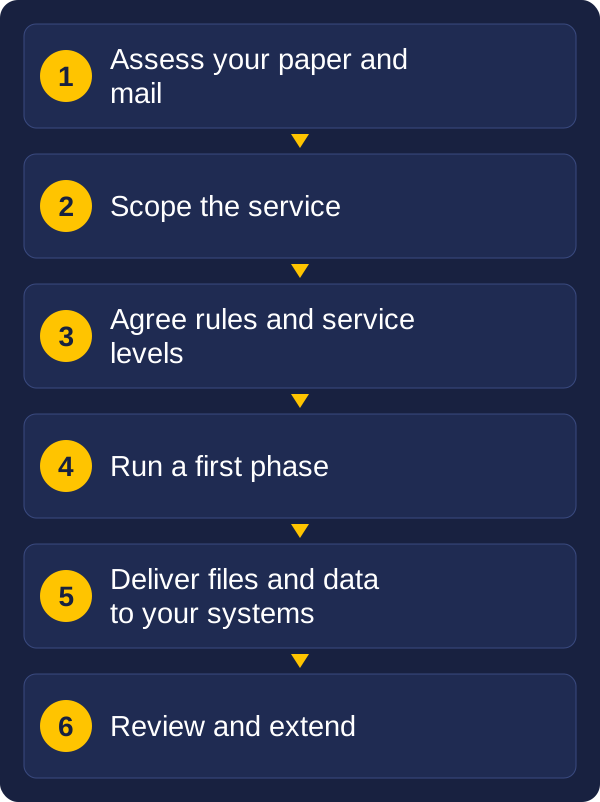
This guide explains the options in plain terms: an outsourced service, an in-house team, or a hybrid of the two. It covers the digital mailroom, how files and data come back to you, the service levels worth putting in writing, and how Vision and Beyond sets the service up so it works from the first day. It is general information, not legal advice, so check your own obligations.
"Outsourcing" is not one service. It is a menu, and most organisations choose only part of it.
Vision and Beyond brings these together. We assess your paper and mail, scope the service, and organise the scanning, digital mailroom and storage through our partners. We also supply the scanners and capture software for work you keep in-house, and build the integration that connects everything to your systems. You deal with one team, whichever mix you choose.
A digital mailroom moves the mail from your front desk to a specialist site, and delivers it to your staff as digital files. Providers describe slightly different steps, but the flow is similar:
The result is that staff, wherever they work, see the same mail at the same time, instead of waiting for paper to be sorted and passed around.
Not everything should be opened by a third party. A good service starts with a clear "do not open" list, agreed with you before go-live. Common candidates are mail marked private or confidential, mail addressed to a named person rather than a role, legal and court documents, and anything your own policy says only the recipient may open.
Those items are logged, delivered unopened to the right person, or opened only by someone you nominate. Review the list regularly, and check how the provider handles items that fall outside it, so staff are not left guessing.
| Item | In-house | Outsourced | Hybrid |
|---|---|---|---|
| Best when | Volumes are steady, and you want control | Volumes are large, uneven or one-off, or you lack space and staff | Some work suits an expert and some stays close to the business |
| Equipment and staff | You buy, run and staff it | The provider supplies both | You run day-to-day scanning, the provider handles peaks and backlogs |
| Speed | Scans as soon as paper arrives | Depends on the agreed turnaround, often hours for mail | Fast where it matters, and flexible at peak |
| Cost pattern | Upfront equipment, ongoing staff and upkeep | Regular fees, often per page, per item or per month | A mix, with spending matched to each job |
| Sensitive documents | Stay on your premises | Leave your premises, so security and contract terms matter | Sensitive items stay in-house, the rest goes out |
| Flexibility | Limited by your team and equipment | Scales up and down | Scales where needed |
A few patterns are common:
Hybrid is often the best fit for organisations that do not want to pick one extreme. It lets you test an outsourced service on a small scale before committing more.
A service is only as useful as what it hands back. Agree the delivery before work starts, because it decides how much effort your team spends afterwards.
If the files are going into a system you already use, ask early about the connection. Vision and Beyond can build the integration so scanned documents and extracted data arrive in the right place automatically. See What Happens After the Scan for how captured data feeds business tasks.
A service level agreement (SLA) turns a promise into something you can measure. "Fast" and "accurate" mean little until they have a number, a way of being measured and a consequence if they are missed.
| Measure | What to agree | Why it matters |
|---|---|---|
| Turnaround | Time from receipt to delivery, for mail and for batches, and what counts as urgent | Mail delivered in hours is not the same as mail delivered in days |
| Completeness | Every page accounted for, with a reconciliation of what was received against what was returned | Missing pages are the most damaging error |
| Image quality | Resolution, colour or black and white, readability, and how mis-scans are found and corrected | Poor scans cost more to fix than to avoid |
| Index accuracy | A target percentage for key fields, and how it is sampled | Wrong index data means documents cannot be found |
| Delivery | Format, destination and time of day | Files must reach the system people actually use |
| Availability | Uptime for any portal or system you rely on | Access you cannot reach is not access |
| Retrieval | How fast stored originals can be recalled, for routine and urgent requests | Delays hold up decisions |
| Reporting | Regular figures on volumes, turnaround, errors and exceptions | You can only manage what you can see |
| Security events | How and how quickly you are told of a problem | You may have obligations of your own |
| Destruction and exit | Certificates of destruction, return of originals and data, and any exit fees | You can leave without losing records |
Two practical points. First, agree how each measure is checked, such as a sample of a set size each month, so that results can be compared fairly. Second, agree what happens when a target is missed, whether that is correction at no cost, a fee credit or a formal review. A target with no consequence is only a goal. Vision and Beyond agrees the measures that matter for your work, sets up the reporting, and reviews the results with you regularly.
As a guide, some providers quote index accuracy figures starting around the high 90s in percent, and mail delivered the same day. Treat any figure as a starting point, and agree how it will be measured for your work.
When documents leave your building, you need to know who handles them at every step. Many of them contain personal or commercial information, so security is not optional.
For Australian organisations, three areas deserve attention:
Privacy obligations can still apply to you when a provider handles personal information on your behalf, and the contract is usually the main way those obligations are passed on. Government bodies often have additional rules from their state or national archives, for example on which facilities may be used and on proving that records were destroyed properly. Check with your legal or records adviser which requirements apply to you, and make sure the contract reflects them.
Finally, plan for the end of the relationship. The agreement should say how you get your originals and data back, in what format, by when and at what cost. We agree each of these points with you in writing before work starts.
Prices vary too much to quote here, but the cost drivers are consistent. Knowing them helps you see where the cost comes from.
Vision and Beyond scopes each service from a sample of your own paper and mail, so the price reflects your actual documents and not an average. Everything is itemised, including storage, retrieval and exit, so there are no surprises later. Outsourcing also takes some setup effort on both sides, such as agreeing the rules, preparing the paper and connecting delivery to your systems. The benefit builds once the process is running.
As a rule of thumb, outsourcing suits one-off projects, uneven volumes and organisations without space or staff. In-house suits steady volumes, sensitive material and a need for immediate scanning. If you are unsure, we usually suggest starting with one mail stream or one part of the archive, or with a hybrid, because it keeps the first step small.
The details decide whether an outsourced service works. Before anything starts, Vision and Beyond agrees these points with you in writing:
Because Vision and Beyond also supplies scanners, capture software and integration, we can adjust the mix as your needs change. A service that starts as a digital mailroom can add in-house scanning for sensitive records, or backfile scanning for an archive, without changing who you work with.
A service that receives your incoming mail, opens and scans it, reads the key details, and delivers it to the right person or system as digital files, usually within hours.
Common examples are mail marked private or confidential, mail addressed to a named person, and legal documents. A do-not-open list is agreed before go-live.
Outsourcing suits one-off projects, uneven volumes and organisations without space or staff. In-house suits steady volumes and sensitive material. A hybrid combines the two.
Turnaround, completeness, image quality, index accuracy, delivery, retrieval, reporting, security events, and destruction and exit, each with a way of being measured.
As agreed files and index data, delivered to a portal, shared folder, records system or directly into a business system through integration.
Begin with four facts: how much paper and mail you handle, how sensitive it is, how quickly it needs to reach people, and what the files need to do once they are digital. The answers usually point to outsourcing, in-house or a mix, and show where a first phase would be safest.
Vision and Beyond supplies scanners and capture software, builds the integration that connects them to your systems, and organises outsourced scanning and digital mailroom services through our partners. We start by scoping the work with you, then agree a first phase so the effort and cost are clear from the beginning, and we stay involved afterwards. If you would like to talk it through, send us a message with your volumes, the type of mail and records, and what you want to improve.
These guides may also help:
Tell us what you scan, roughly how much, and what you need to do with the files. We will reply with a recommendation.